New · Synth Bass

Reach New
Depths.

LOWRaudio builds warm, analog-modeled instruments and effects that bring real character to your low end. It starts with LOWR Synth Bass.

Instant download · Free lifetime updates · VST3 · AU · Standalone

VST3AUStandalonemacOSWindows64-bit

Built for the mix

Everything you need.
Nothing you don't.

Analog warmth

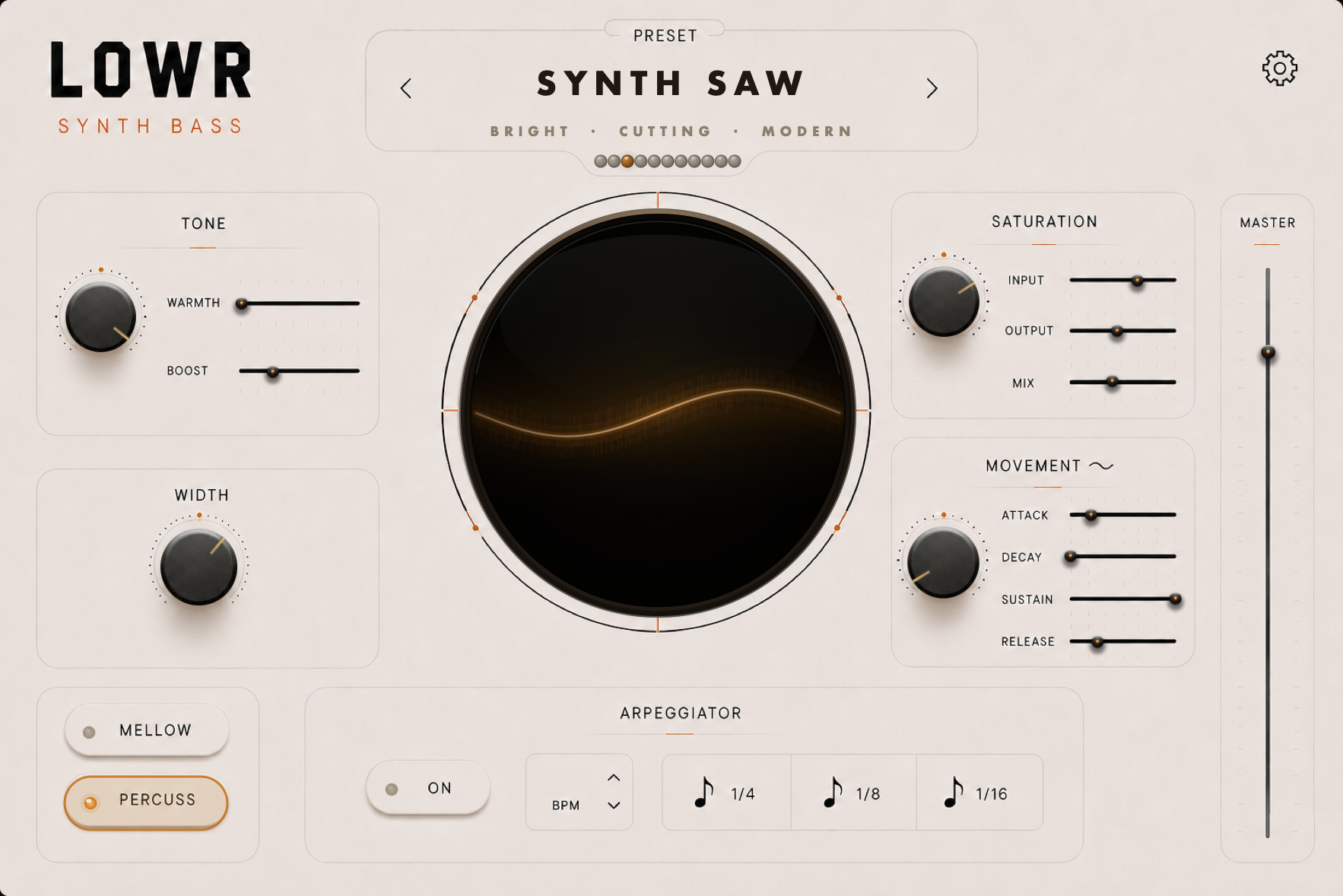
Tone and boost on tap. Shape the body of your bass from sub-heavy to bright and forward, no EQ required.

Built-in arp

Tempo-synced arpeggiator with 1/4, 1/8 and 1/16 divisions. Turn a single held note into a driving bassline in one click.

Width control

Open up the stereo field without losing the center. Big, wide bass that still translates on a single speaker.

Smart saturation

Input, output and mix over an analog-modeled drive stage. Add grit and presence, or blend it in parallel.

Featured · Out now

This is LOWR Synth Bass.

LOWR Synth Bass full plugin interface, Synth Saw preset

LOWR Synth Bass

$34.99 $21.99 one-time

Save 37% · launch offer Get LOWR Synth Bass

The first LOWR plugin · Synth Bass

Analog warmth,
modern weight.

Two character voices: Mellow for round, rolling sub, and Percuss for tight, cutting attack. Push the saturation for harmonic drive that translates on small speakers, or keep it clean and let the low end breathe.

  • Mellow & Percuss character modes
  • Multi-stage analog-style saturation
  • Stereo width without losing the center

Warmth

Saturation

Width

Real renders straight from the plugin. Scroll the rack and tap any preset to hear it. Found something you like? Tweak it and save it as your own.

Scroll or use your wheel to hear more →

Questions, answered

Everything you might be wondering.

Will it work in my DAW?

Yes. LOWR Synth Bass ships as VST3 (macOS & Windows) and AU (macOS), plus a standalone app — all 64-bit. It runs in Ableton Live, Logic Pro, GarageBand, FL Studio, Cubase, Studio One, Reaper, and more.

Do I need a MIDI keyboard?

LOWR Synth Bass is played via MIDI and doesn't have an on-screen keyboard. In a DAW that's no issue — trigger it from your DAW's piano roll or any MIDI controller. The standalone app has no DAW to send it notes, so it needs an external MIDI controller to play.

How do I install it on macOS?

LOWRaudio is a brand-new independent developer, so the macOS build isn't notarized by Apple yet — macOS may warn that it "can't be checked for malicious software." It's safe; this just takes one extra step. Follow our quick macOS install guide and you'll be up and running in about a minute.

Do I need to know synthesis to use it?

Not at all. Start from a preset, find a sound you like in seconds, and tweak from there. The controls are designed to be musical, not technical.

Is it really a one-time price?

Yes, no subscription ever. One payment gets you the plugin plus free lifetime updates, including new presets and features as they land.

Can I use it on more than one computer?

Yes. Your purchase includes 3 licenses, so you can register and run LOWR Synth Bass on up to three of your own devices, like a studio desktop, a laptop on the road, and one more.

Can I save my own presets?

Absolutely. Dial in a sound you love and save it as your own preset, right alongside the factory library, so your sounds are always one click away.

What's next from LOWRaudio?

Synth Bass is the first release. More analog-modeled instruments and effects are on the way, and buying in now means free updates plus a say in where the LOWR sound goes next.